
Random Team Generator – Split Names Into Teams
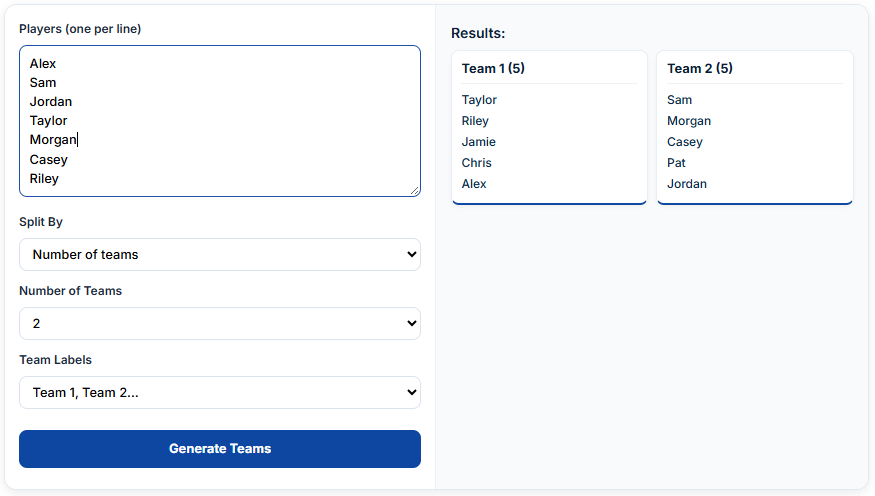
Need to divide a group of people into teams without choosing members manually? The random team generator on RandomNamePick lets you enter a list of names and split them into separate groups. Choose how to divide the list, select the number of teams and team labels, then click Generate Teams to view the results.
This random team picker is useful for classrooms, sports activities, office projects, group games, workshops, and other situations where you need to assign people to teams quickly.
How to Use the Random Team Generator
You can create teams from your own list of participants. Follow these steps to organize your entries and generate groups.
1. Enter Your Names
Start with the Players (one per line) field. Type or paste the names of everyone who needs to be assigned to a team.
For example:
Alex
Jordan
Taylor
Morgan
Casey
Riley
Jamie
Cameron
Enter one participant per line. Check the list before generating teams so that names are spelled correctly and nobody is accidentally included more than once.
You can use this random team generator with names for students, friends, colleagues, players, or other participants.
2. Choose How to Split the List
The Split By dropdown controls how the entered players are divided. Select the available grouping method that matches your activity.
Think about your goal before choosing. You may want a particular number of groups, or you may need to organize participants according to a team-size requirement. The exact choices depend on the options displayed in the dropdown.
3. Select the Number of Teams
Use Number of Teams to choose how many groups you want to create.
For example, a classroom activity might need four teams, while a small game may require only two. Choose a number that makes sense for the number of people on your list.
If the participants cannot be divided evenly, some teams may have one more member than others. That is a normal result when the total number of people does not divide equally.
4. Choose Team Labels
The Team Labels dropdown lets you select how the generated teams are identified. Clear labels make the results easier to read and share.
This is especially helpful when you are organizing several groups for a classroom activity, competition, or group project.
5. Generate Your Teams
After entering the names and selecting the available settings, click Generate Teams. Your team assignments will appear in the Results section.
Review the groups and use the generated arrangement for your activity. If you want a different arrangement, adjust your selections or generate another set.
When Should You Use a Random Team Picker?
Random assignment is useful when you want to avoid repeatedly choosing the same people or allowing group selection to take up too much time.
Here are some practical situations where a random team selection tool can help.
Classroom and School Activities
Teachers can enter a class list and divide students into groups for discussions, presentations, projects, and classroom games. Random grouping can give students opportunities to work with classmates they might not normally choose.
For longer academic projects, however, random assignment may not always be the best approach. The University of Nebraska–Lincoln’s guide to forming teams explains how group size, project requirements, skills, and experience can influence team formation.
Sports and Practice Sessions
Coaches, teachers, and recreational organizers can use a team generator to divide available players into groups for practice activities or friendly matches.
For example, enter the names of everyone attending a training session and generate teams before starting a small-sided game. If players have significantly different skill levels, review the results and make any adjustments needed for a suitable match.
Office Projects and Workshops
A team generator online can help managers, facilitators, and workshop organizers assign people to short activities without spending time manually arranging every group.
Random groups can also encourage colleagues from different departments to interact during brainstorming sessions or team exercises.
Parties and Group Games
When friends or family members need to form teams for a quiz, board game, challenge, or competition, random assignment provides a quick starting point.
Enter the participants, generate the groups, and decide which activity each team will play.
How to Make Better Teams
Random selection is convenient, but the best grouping method depends on what the teams need to accomplish.
Consider these practical points before using the generated results.
Check the total number of participants: Make sure everyone who should take part is included.
Choose a suitable group size: Small activities may work well with pairs or small groups, while more complex projects may need larger teams.
Consider the purpose: A casual game and a semester-long project may require different approaches to team formation.
Review skill differences: Random assignment does not guarantee that every team will have the same experience or ability.
Explain the activity clearly: Once teams are formed, give everyone a shared goal and explain what each group needs to do.
The University of Illinois guide to group learning discusses random and instructor-selected team formation, including when different grouping methods may be useful. The University of Minnesota’s guide to forming groups also explains why group composition, skills, and experience matter.
Random Team Generator vs. Random Team Name Generator
These tools solve two different problems.
A random team generator divides a list of people into groups. It helps answer the question: Who should be on each team?
A random team name generator creates names for those groups. It helps answer the question: What should we call each team?
If you have already assigned your members but need creative group names, use the Random Team Names generator. You can use both tools together: first organize the members, then choose names for the resulting teams.
Random Team Generator vs. Team Wheel
A random team generator and a team wheel are not the same thing.
This page divides an entire list of participants into multiple groups. A wheel is generally used to select one entry from a list at a time.
If you want a visual way to choose an individual participant, try the Random Name Wheel. For other everyday choices, the Spin the Wheel tool offers a separate wheel-based experience.
Frequently Asked Questions
1. What is a random team generator?
A random team generator is an online tool that divides a supplied list of people into groups. It helps teachers, coaches, organizers, and friends assign participants without manually selecting every team member.
2. How do I generate random teams with names?
Enter each participant’s name on a separate line in the Players field. Choose the available Split By option, Number of Teams, and Team Labels settings, then click Generate Teams.
3. Can I use this team generator online for classroom activities?
Yes. Teachers can enter student names and create groups for discussions, classroom games, presentations, and other activities. For longer projects, consider whether students’ skills and experience should also influence the assignments.
4. Can I create teams of two?
The tool provides a Split By setting and a Number of Teams setting. Check the available Split By options to see whether grouping by team size is supported. Do not assume a specific two-person setting unless it appears in the interface.
5. Does the random team generator balance skill levels?
The tool creates groups from the participant list and the selected settings. It does not show a dedicated skill-rating or skill-balancing control, so review the results manually if equal experience or ability is important.
6. Is this a random team generator wheel?
No. This tool uses a participant list and dropdown settings to generate groups. It does not display a spinning wheel for team assignment.
7. Can I generate football, NBA, or NFL teams?
This page is designed to divide names you provide into groups. It is not a database of professional football, NBA, or NFL rosters, and it does not automatically create FC, FIFA, Pokémon, or Genshin Impact squads.