
Spin the Wheel – Random Wheel Picker for Everyday Choices
Can’t decide what to do, what to eat, or which option to choose? Use this spin the wheel tool to make everyday decisions easier. Select a preset, spin the wheel, and let it choose an option for you.
This random wheel picker includes different presets for common activities, including chores, custom names, yes or no decisions, numbers, food ideas, colors, and Truth or Dare. Instead of spending time comparing every possibility, you can use the wheel to make a quick selection.
How to Use the Spin the Wheel Tool
Using this online wheel spinner is simple. Follow these steps to get started.
1. Choose a Wheel Preset
Start by selecting an option from the Wheel Preset dropdown. The available presets include:
- Chores: Choose a household task or cleaning activity.
- Custom Names: Select a person or name from your choices.
- Yes or No: Get a quick answer when you are deciding between two possibilities.
- Numbers 1–10: Spin to select a number from 1 to 10.
- Food Ideas: Let the wheel help you decide what to eat.
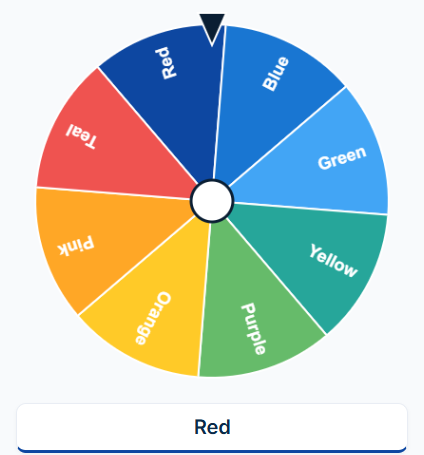
- Colors: Choose a color for a game, drawing, or creative activity.
- Truth or Dare: Add fun and spontaneity to a group activity.
Choose the preset that matches the decision or activity you have in mind.
2. Review Your Entries
The tool includes an Entries (one per line) field. Review the available entries for your selected preset and enter or adjust your choices if the tool allows you to customize them.
For example, if you want to use your own names, enter each person’s name on a separate line:
- Alex
- Sarah
- Michael
- Emma
- Daniel
You can use the Custom Names preset when you want to select someone from your own list.
3. Select the After Each Spin Option
The After Each Spin setting lets you choose how the entries behave after a result is selected. Check the available options and select the behavior that suits your activity.
This is useful when you plan to make several selections in a row and want the wheel to handle entries according to your preferred setting.
4. Click Spin the Wheel
Once your preset and entries are ready, click Spin the Wheel. The wheel will make a selection and display the result in the Results section.
You can spin again whenever you need another result. Review your selected After Each Spin setting before continuing.
Explore the Available Wheel Presets
Each preset is designed around a different type of everyday choice or activity.
Chores Wheel – Choose a Household Task
The Chores preset can help when you need to decide which household task to complete. Instead of choosing the same job every time, use the wheel to make the selection.
You can use it for activities such as:
- Cleaning your room
- Washing dishes
- Sweeping the floor
- Organizing a cupboard
- Taking out the trash
- Folding laundry
A chores wheel can also make household responsibilities more interesting when family members want to decide who handles a particular task.
Custom Names Wheel – Pick a Person
The Custom Names preset is useful when you need to select someone from a group. It can help teachers, friends, families, and team leaders make simple selections.
Possible uses include:
- Choosing who goes first in a game
- Selecting a student to answer a question
- Deciding who leads a group activity
- Picking a participant for a challenge
- Assigning a turn during a family game
For a more focused name-selection experience, you can also try our Random Name Wheel. That page is specifically intended for selecting from a list of names or options.
Yes or No Wheel – Make a Quick Decision
Sometimes you only need a simple yes-or-no answer. The Yes or No preset gives you a quick way to approach small everyday decisions.
You might use it to decide whether to try a new activity, start a casual game, or settle a lighthearted question with friends.
Remember that a wheel result is just a random selection, not professional advice. Important decisions about health, money, safety, or other serious matters should be made using appropriate information rather than a wheel.
You can also visit our Random Yes or No Generator for a dedicated yes-or-no decision tool.
Numbers 1–10 Wheel – Pick a Random Number
The Numbers 1–10 preset is useful when you need a number for a simple game or activity.
For example, you could use it to:
- Choose a number for a classroom game
- Select a turn in a friendly competition
- Create a quick number-based challenge
- Pick a number for a drawing activity
- Make a simple game more unpredictable
If your activity requires a number outside the 1–10 range, use a suitable number-selection method instead.
Food Ideas Wheel – Decide What to Eat
Can’t agree on what to eat? The Food Ideas preset can help make mealtime decisions more fun.
Use it when you are choosing a meal, planning a snack, or deciding what to prepare at home. It can also help families and friends settle casual food-related disagreements.
For more inspiration, explore our Random Questions Generator to create conversation prompts for your next meal or gathering.
Colors Wheel – Select a Random Color
The Colors preset can be useful for creative activities, drawing games, crafts, and design challenges.
For example, you can use a selected color as a prompt for a painting, choose a color theme for an activity, or create a fun challenge with friends.
If you need another creative starting point, try the Random Object Generator for ideas about what to draw or describe.
Truth or Dare Wheel – Add Fun to Group Activities
The Truth or Dare preset can add excitement to a casual gathering with friends or family.
Use it as part of a party game, a friendly challenge, or a social activity. Make sure everyone is comfortable participating and that the activities remain appropriate for the group.
You can also use our Random Trivia Questions Generator to add quiz questions to your next group game.
When Should You Use a Random Wheel Picker?
A random wheel picker can be useful in many situations where you have multiple choices and need a simple way to select one.
For Home and Family
Use the Chores preset to decide which household task to complete. You can also use Food Ideas when everyone has a different opinion about dinner.
For Classrooms
Teachers can use Custom Names or Numbers 1–10 for simple classroom activities. The wheel can help select participants or introduce a little variety into a lesson.
For Parties and Friends
Truth or Dare and Custom Names can be useful for casual group games. Set the rules before starting so everyone knows what to expect.
For Creative Activities
Use the Colors preset for drawing challenges, crafts, and creative exercises. You can also combine wheel selections with prompts from our Random Topics Generator to create a discussion or writing activity.
Spin the Wheel vs. Random Name Wheel
Both tools use a spinning wheel, but they serve different purposes.
The Spin the Wheel page offers multiple presets for everyday choices, such as Chores, Yes or No, Numbers 1–10, Food Ideas, Colors, and Truth or Dare. It is suitable for different activities and decisions.
The Random Name Wheel focuses more specifically on selecting a person or option from a custom list. Use that page when your main goal is to pick a name or choose a winner from your own entries.
In short, choose Spin the Wheel for different preset activities and Random Name Wheel for name-based selection.
Tips for Getting Better Results
A few simple habits can make your wheel activities easier:
- Choose the right preset: Select a category that matches your decision.
- Review your entries: Make sure the choices are correct before spinning.
- Use clear names and labels: Keep entries easy to understand.
- Check the After Each Spin setting: Choose the behavior that fits your activity.
- Keep activities appropriate: Make sure everyone involved is comfortable with the choices.
- Use the result as a prompt: A wheel can help with small decisions, but you can still use your judgment.
Frequently Asked Questions
1. What is a spin the wheel tool?
A spin the wheel tool is an interactive selection tool that uses a spinning wheel to choose an option. You can use it for household chores, food ideas, colors, numbers, names, and group activities.
2. What presets are available in this wheel?
The available presets include Chores, Custom Names, Yes or No, Numbers 1–10, Food Ideas, Colors, and Truth or Dare.
3. Can I use this wheel to pick a random name?
Yes. Select the Custom Names preset to work with names. If you need a more dedicated name-selection tool, visit our Random Name Wheel page.
4. How does the Yes or No preset work?
Choose the Yes or No preset and spin the wheel to get a selection. It is intended for casual, low-stakes decisions and fun activities, not important personal or professional decisions.
5. Can I use the wheel to decide what to eat?
Yes. Select Food Ideas to use the food-related preset when you need inspiration for a meal or snack decision.
6. What is the Numbers 1–10 preset used for?
It lets you make a selection from numbers 1 through 10. You can use it for simple games, activities, and number-based challenges.
7. Can I use the Truth or Dare preset at a party?
Yes. It can add variety to a casual party or group activity. Keep the game respectful, voluntary, and appropriate for everyone participating.
8. Is the result guaranteed to be fair?
A wheel offers a visual way to select an option, but its appearance alone does not establish that the selection process is independently verified or audited. For official competitions or high-value giveaways, use a service with transparent and verifiable selection procedures.
Try the Spin the Wheel Tool
Whether you need to choose a household chore, settle a food decision, pick a color, select a number, or add fun to a group activity, this spin the wheel tool gives you a simple way to make a selection.
Choose one of the available presets, review your entries, set the After Each Spin behavior, and click Spin the Wheel. Let the wheel help you make your next everyday choice.