
Random Emoji Generator – Get Random Emojis Online
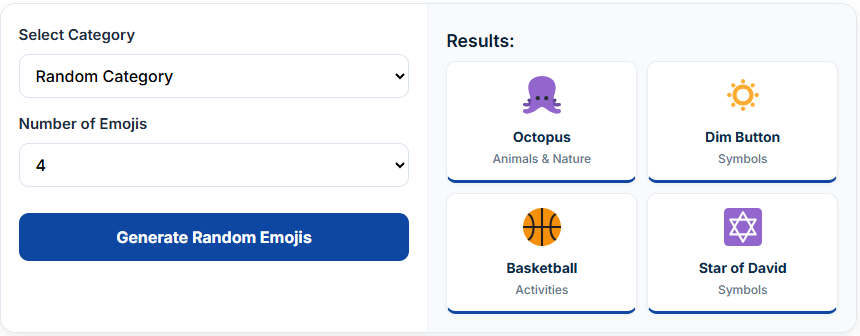
Need a random emoji for a message, social media post, game, or creative project? Our random emoji generator helps you discover emojis without searching through a keyboard or browsing long emoji lists. Select a category, choose the number of emojis, and click Generate Random Emojis to see your results.
This random emoji generator online is useful for finding unexpected symbols, creating fun prompts, adding visual variety to messages, and getting inspiration for everyday digital content.
What Is a Random Emoji Generator?
A random emoji generator is an online tool that selects emojis automatically. Instead of choosing each symbol manually, you can use a generator to discover different emoji ideas with a few clicks.
Emojis are small pictorial characters used in digital communication. They can represent emotions, objects, activities, animals, food, places, and many other concepts.
For example, a random selection might inspire combinations such as:
🌸 ✨ 🦋
🍕 🎮 😎
🐱 🌈 💖
⚽ 🏆 🔥
These are illustrative examples, not guaranteed outputs from the tool.
A random emoji picker can be useful when you want a fresh idea but do not have a particular emoji in mind.
How to Use the Random Emoji Generator
The tool provides a simple interface with category and quantity settings.
1. Select a Category
Use the Select Category dropdown to choose an available category. This setting helps you narrow your emoji selection instead of relying only on an unrestricted random choice.
The exact category options are displayed in the live generator.
2. Choose the Number of Emojis
Open the Number of Emojis dropdown and select how many emojis you want to generate.
Choose a smaller number when you need one or two symbols for a message. A larger selection can be more useful for creative activities, games, or brainstorming.
3. Generate Random Emojis
Click Generate Random Emojis to create your selection.
4. Review the Results
Your generated emojis appear in the Results section. Review the selection and use the symbols that fit your intended purpose.
You can change the settings and generate another selection when you want different ideas.
Creative Ways to Use Random Emojis
Random emojis can be useful for more than adding decoration to a message. They can also provide inspiration for games, writing exercises, and social activities.
Social Media Posts and Captions
Emojis can add personality and visual variety to social media content. A suitable symbol can help communicate a mood, highlight a topic, or complement a short caption.
For example, a travel post might use ✈️ 🌍 📸, while a food-related post could use 🍔 🍟 😋.
If you need complete caption ideas rather than individual symbols, try the Instagram Caption Generator. It includes an emoji setting alongside its caption options.
Instagram Bios and Profile Ideas
A few relevant emojis can make a social media bio easier to scan and visually distinctive. For example, a travel enthusiast might use ✈️, a photographer might use 📸, and a fitness profile might use 💪.
You can also explore the Instagram Bio Generator when you need bio suggestions with an emoji option.
Emoji Guessing Games
Random emojis can become prompts for simple guessing games. Generate a selection and ask friends to identify the objects, activities, animals, or emotions represented.
You can also create a movie-guessing challenge by combining a few symbols and asking other players to guess the title.
Storytelling and Writing Prompts
Writers and students can use random emojis as creative prompts. Pick three unrelated symbols and build a short story that connects them.
For example:
🏰 A mysterious castle
🐉 A dragon
🔑 A hidden key
These symbols can inspire a fantasy story, classroom writing exercise, or role-playing scenario.
Classroom Activities
Teachers can use emojis to introduce vocabulary, encourage storytelling, or create simple visual quizzes. Students can describe what an emoji represents or create sentences using a random selection.
Group Chats and Everyday Messages
Emojis can make informal conversations more expressive. A random selection may give you an unexpected reaction, a funny reply idea, or a new way to communicate with friends.
Understanding Emoji Categories and Unicode
Emojis are not simply decorative pictures. They are encoded characters and sequences supported by the Unicode Standard.
The Unicode Emoji Technical Standard explains how emoji characters and sequences are defined, including presentation styles and skin-tone modifiers.
The official Unicode Full Emoji List provides emoji characters, names, code points, and related information.
Common emoji themes include:
Smileys and emotions: Faces and expressions used to communicate feelings.
People and body: Human figures, gestures, and body-related symbols.
Animals and nature: Animals, plants, flowers, and natural elements.
Food and drink: Meals, snacks, fruits, beverages, and cooking-related symbols.
Travel and places: Vehicles, buildings, destinations, and geographical symbols.
Activities: Sports, celebrations, hobbies, and entertainment.
Objects: Everyday items, tools, devices, and household objects.
Symbols: Signs, hearts, arrows, and other visual characters.
Flags: Emoji sequences representing countries and regions.
These are common Unicode emoji groupings. They should not be interpreted as a confirmed list of every category available in this particular generator.
Tips for Choosing the Right Emojis
A random selection can give you ideas, but the most useful emoji is the one that fits your message.
Consider the context: Choose symbols that relate to your topic rather than adding unrelated emojis.
Avoid overcrowding: Too many emojis can make a caption or message difficult to read.
Match the tone: A playful message may suit expressive faces, while a professional update may need fewer decorative symbols.
Consider your audience: Some emojis have different interpretations across communities and contexts.
Check the display: Emoji designs can look different on Apple, Android, Windows, and other platforms.
Unicode standardizes emoji characters and sequences, but the visual artwork is generally provided by individual platforms. This means the same emoji can have slightly different appearances on different devices.
Random Emoji Generator vs. Other Creative Tools
Different tools serve different content needs.
Random Emoji Generator: Selects emojis based on the available category and quantity settings.
Instagram Caption Generator: Creates caption ideas and provides an emoji setting.
Instagram Bio Generator: Helps create profile descriptions with an emoji option.
Random Color Generator: Provides color selections for graphics, websites, and other creative projects.
Spin the Wheel: Helps select an option through a wheel-based random selection experience.
You can discover these and other generators through the Random Tools collection.
If you are creating a visual post, combining suitable emoji ideas with a thoughtful color selection from the Random Color Generator can help you explore different creative directions.
Important Limitations
The current Random Emoji Generator visibly provides a category dropdown, a number-of-emojis dropdown, a Generate Random Emojis button, and a Results section.
The exact dropdown options and the generator’s underlying emoji dataset are not confirmed by the visible page information. Therefore, users should check the live controls rather than assume that every Unicode emoji, skin tone, flag, or special sequence is included.
Emoji appearance also depends on the device, operating system, application, and font used to display it. A symbol may look different across platforms or may not display correctly on an older device.
Frequently Asked Questions
1. What is a random emoji generator?
A random emoji generator is an online tool that selects emojis automatically. It can help you discover symbols for messages, social media posts, games, creative writing, and other activities.
2. How do I generate random emojis?
Open the generator, select a category, choose the number of emojis, and click Generate Random Emojis. Your selection will appear in the Results section.
3. Can I choose an emoji category?
The tool includes a Select Category dropdown. You can use the available options to guide your selection. Check the live dropdown to see the categories currently offered.
4. What can I use random emojis for?
You can use random emojis for social media content, messages, storytelling prompts, classroom activities, guessing games, and creative brainstorming.
5. Why do emojis look different on different devices?
Unicode defines the underlying emoji characters and sequences, but platforms create their own visual designs. As a result, the same emoji may look slightly different on an iPhone, Android phone, or computer.
6. Are all Unicode emojis available in this generator?
The exact emoji dataset is not specified in the visible interface. Do not assume that the generator includes every Unicode emoji or every available skin-tone and flag variation.
7. Is a random emoji generator useful for social media?
Yes. Random emoji selections can help you discover symbols for captions, comments, bios, and posts. Choose emojis that match your content and audience rather than adding them without context.
Discover Your Next Random Emoji
Finding a new emoji can be a simple way to add creativity to digital communication. Use the category and quantity settings in the random emoji generator, click Generate Random Emojis, and explore the results for your next message, caption, game, or creative idea.